- Home Page /
- Electronics /
- Computer Accessories /
- Computer Accessories & Peripherals /
- Input Devices /
- Graphics Tablets /
- XPPen Artist 24 Pro 2.5K QHD Drawing Tablet w...
0 ratings






Item #:
47008770
XPPen Artist 24 Pro 2.5K QHD Drawing Tablet with Screen,16.7M Colors Graphics Tablet with 8192 Pen Pressure Battery-Free Tilt Stylus & 20 Shortcut
Item #:
47008770
SCR 3576
Price Details
Excluding Shipping & Custom charges ( Shipping and custom charges will be calculated on checkout )
*All items will import from US
In stock
 Imported from USA store
QTY:
Only 7 items left in stock.
Order now and get it around Tuesday, June 30
Secured transaction
Ubuy works hard to protect your security and privacy. Our advanced payment security system ensures confidentiality by encrypting your information during transmission using AES (Advanced Encryption Standards) and SSL (Secure Socket Layer) protocols. Your payment details are 100% secure as we do not share your payment details with third party sellers.
Our Top Logistics Partners


Drawing on an Artist 12 Pro feels like drawing on paper. The secret is the fully-laminated screen, meaning that it gives no parallax.

Fast
Shipping

Free
Return*

Secure Packaging

100% Original Products

PCI DSS Compliance

ISO 27001 Certified


Note: Step Down Voltage Transformer required for using electronics products of US store (110-120). Recommended power converters Buy Now.


What Stands Out
Full-Laminated Display
Provides a stunning visual experience with reduced parallax, ensuring precision and clarity while drawing, enhancing workflow efficiency.
Battery-Free Stylus
Offers a hassle-free drawing experience with 8192 levels of pressure sensitivity, ensuring natural and accurate strokes without the need for battery replacements.
Customizable Shortcuts
Equipped with 8 customizable shortcut keys for enhanced productivity, allowing artists to streamline their processes and focus more on creativity.
Product Details
- Experience 2.5K QHD Clarity: The Artist 24 Pro features a 23.8-inch IPS display with 2.5K QHD resolution (2560 x 1440), delivering vibrant colors and sharp detail. Its high pixel density ensures clarity for intricate designs, while the anti-glare film and 178° viewing angle enhance the immersive experience. Ideal for artists, illustrators, animators, and video editors looking for precision and quality in their work
- Designed for Comfortable Creation: The Artist 24 Pro boosts your workflow with 20 customizable shortcuts and dual red dial wheels, mapped to standard Photoshop shortcuts, allowing designers to switch tools effortlessly without interrupting their workflow.The 90° adjustable stand ensures you can find the perfect working angle for maximum comfort. A built-in pen slot keeps your stylus secure and within easy reach. Ideal for artists, designers, and architects who value both ease and efficiency
- Dual Stylus with Double Precision: The PA2 drawing stylus offers 60° tilt and 8192 levels of pressure sensitivity, delivering smooth, natural strokes that rival traditional tools. Its ergonomic, spindle-shaped design ensures comfort during long drawing sessions, while the stable nib and genuine 220 RPS report rate provide precise, consistent performance. Ideal for artists and designers who need reliability, control, and a natural feel in every stroke
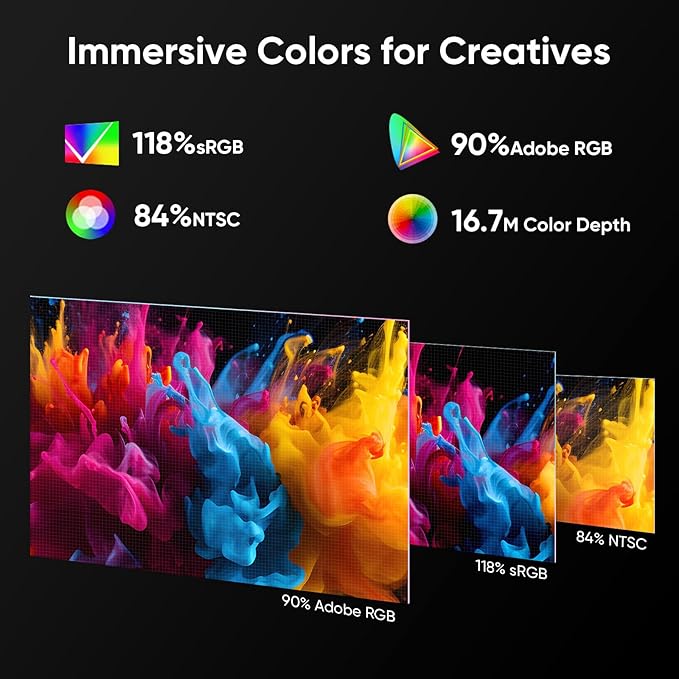
- Immersive Colors for Creatives: The XPPen 24 Pro offers a vibrant color gamut of 118% sRGB, 84% NTSC, and 90% Adobe RGB, ensuring accurate color reproduction. Graphic designers, illustrators, animators, and video editors can enjoy lifelike visuals and smooth gradients, thanks to the 16.7M color depth and with a high contrast ratio of 1000:1, details in both dark and bright areas remain clear, making it perfect for color grading, digital painting, and detailed artwork
- Effortless Connectivity: The Artist 24 Pro offers full-featured Type-C cable(included)connectivity for easy, adapter-free connections to iMac, MacBook Pro, or Windows computers. The support for HDMI input offer versatile connectivity options. The reversible USB-C connector ensures hassle-free plug-and-play functionality. The standard VESA mount (100x100mm) offers flexible mounting options. These features streamline your setup and enhance productivity, letting you focus on your creativity
- Versatility and Compatibility: The art tablet is compatible with Windows 7 (or later), Mac OS X 10.10 (or later), Linux, and Chrome OS 88 (or later). The most mainstream software on the market is compatible, such as PS, AI, AE, Blender, CSP, Toon Boom, and so on
- What You Get: 1 x XPPen 23.8” Drawing Display, 2 x Battery-Free Stylus, 1 x USB-A to USB-C adapater, 1 x USB-C to USB-C Cable, 1 x HDMI Cable, 1 x Power Adapter, 1 x Power Cord, 1 x Pen Holder, 8 x Replacement Pen Nibs, 1 x Quick Guide, 1 x Cleaning Cloth, 1 x Black Drawing Glove, 1 x Pen Slot
- PLEASE NOTE: The full-features USB-C cable is included. It is NOT a standalone drawing tablet, you need to use it with your computer or laptop
| Brand | XP-PEN |
| Model Name | Artist24 Pro |
| Built-In Media | 1 x XP-Pen 23.8” Graphics Display, 2 x Battery-Free Stylus, 1 x USB-A to USB-C adapater,1 x USB-C to USB-C Cable,1 x HDMI Cable,1 x Power Adapter,1 x Power Cord,1 x Pen Holder,8 x Replacement Pen Nibs,1 x Quick Guide,1 x Cleaning Cloth,1 x Black Drawing Glove,1 x Pen Slot |
| Target Audience | Animators, Graphic Designers, Illustrators, Professional Artist, Teacher |
| Model Number | Artist24 Pro |
| Manufacturer | XP-PEN |
| Mfr Part Number | XP-PEN Artist24 Pro |
| Unit Count | 1 Count |
| Color | Black |
| Connectivity Technology | HDMI, USB |
| Pressure Sensitivity | 8192 Levels |
| Operating System | Chrome OS 88 (or later), Linux, Mac OS X 10.10 (or later), Windows 7 (or later) |
| Additional Features | 118% sRGB, 84% NTSC, and 90% Adobe RGB, 178° Viewing Angle, 2.5K QHD resolution (2560 x 1440), 20 Customizable Shortcuts and Dual Red Dial Wheels, 60° Tilt Supportg, 8192 Pen Pressure, 220 RPS Report Rate |
| Specific Uses For Product | Online Education,Digital Drawing,Professional Design, Video Edition |
| Compatible Devices | Windows 11/10/8/7, Linux, Chrome OS 88 or later and Mac OS X 10.10 (and higher). |
| Display Type | LED |
| Native Resolution | 2.5K QHD (2560 x 1440) Resolution |
| Screen Size | 23.8 Inches (60.5 cm) |
| Item Weight | 15.4 Pounds (6.99 kg) |
| Item Dimensions L x W | 24.88"L x 14.57"W (63.2 cm) |
| Active Surface Area | 526.85 x 296.35 MM |
| Special Feature | 118% sRGB, 84% NTSC, and 90% Adobe RGB, 178° Viewing Angle, 2.5K QHD resolution (2560 x 1440), 20 Customizable Shortcuts and Dual Red Dial Wheels, 60° Tilt Supportg, 8192 Pen Pressure, 220 RPS Report Rate See more |
Dangerous Goods
To avoid the delay in customs clearance process for Dangerous Goods, the shipment shall be opened at our warehouse facility to check the severity of hazardous components. Please see the list of Dangerous goods here.
What's in the box
1 x XP-Pen 23.8” Graphics Display, 2 x Battery-Free Stylus, 1 x USB-A to USB-C adapater,1 x USB-C to USB-C Cable,1 x HDMI Cable,1 x Power Adapter,1 x Power Cord,1 x Pen Holder,8 x Replacement Pen Nibs,1 x Quick Guide,1 x Cleaning Cloth,1 x Black Drawing Glove,1 x Pen Slot
Who Should Buy?

-
Digital Artists
Ideal for artists seeking a responsive tablet with high pressure sensitivity and tilt function for detailed artwork.
-
Students & Educators
Perfect for students in art or design fields and educators needing an intuitive interface for teaching digital art.
-
Graphic Designers
Suited for graphic designers requiring precision drawing capabilities and customizable shortcut keys for workflow efficiency.

-
Casual Users
Not ideal for casual users who may not utilize advanced features effectively or require simple drawing solutions.
-
Budget-Conscious Buyers
May not fit well for buyers seeking lower-cost options with basic functionality instead of advanced tablet capabilities.
-
3D Modelers
Not designed for 3D modeling tasks that often require different capabilities or specifications than drawing tablets provide.
Product Description
Have any Query? Chat with us
Customer Questions & Answers
-
Question:
What features make the XPPen Artist13.3 Pro a good choice for digital artists?
Answer: The XPPen Artist13.3 Pro boasts a full-laminated screen that reduces parallax and enhances precision, ensuring that your drawings closely match your stylus movements. With 8192 levels of pressure sensitivity, the tablet captures intricate details in your artwork, which is essential for both professional and hobbyist artists. Additionally, the adjustable stand allows you to customize your working angle for optimal comfort, while the 8 shortcut keys streamline your workflow, making it easier to access frequently used tools quickly. -
Question:
How does the 8192 pressure sensitivity benefit my drawing experience?
Answer: The 8192 levels of pressure sensitivity on the XPPen Artist13.3 Pro provide ultimate control over brush thickness and opacity. This feature allows artists to create more nuanced and detailed artwork, enhancing the authenticity of their digital paintings. For instance, a heavier hand can create bold lines or brush strokes, while lighter touch results in subtle shading, giving your work a professional finish with depth and variation. -
Question:
Can I use the XPPen Artist13.3 Pro with different software?
Answer: Yes, the XPPen Artist13.3 Pro is compatible with a wide range of creative software including Adobe Photoshop, CorelDRAW, Clip Studio Paint, and many others. This flexibility makes it an excellent choice for artists working across different platforms. Whether you're illustrating, animating, or photo editing, the tablet seamlessly integrates into your preferred workflow, allowing for a continuous creative process regardless of the software you choose. -
Question:
What are the advantages of having an adjustable stand with the tablet?
Answer: An adjustable stand enhances ergonomics by allowing you to find the most comfortable angle for drawing on the XPPen Artist13.3 Pro. This can help reduce strain on your neck and wrists during long drawing sessions. Proper posture is essential for maintaining comfort and productivity while drawing, making it easier to focus on your artwork without discomfort. Additionally, it aids in achieving a better perspective while working, which is beneficial for detail-oriented tasks. -
Question:
Is the XPPen Artist13.3 Pro suitable for beginners?
Answer: Absolutely! The XPPen Artist13.3 Pro is user-friendly, making it an excellent option for beginners. Its intuitive controls, alongside the clarity of the full-laminated display, can help new artists learn the ropes of digital drawing with ease. The included software and customizable settings allow beginners to explore various artistic techniques and improve their skills effectively without a steep learning curve. -
Question:
What types of art can I create with the XPPen Artist13.3 Pro?
Answer: The XPPen Artist13.3 Pro is versatile enough for a wide range of artistic expressions. Whether you're into digital painting, illustration, concept art, or graphic design, this tablet supports all of these mediums. Its high-quality display and responsive stylus open up opportunities to create anything from detailed portraits to intricate designs, catering to both fine art and commercial art needs. -
Question:
How does full-laminated technology benefit drawing accuracy?
Answer: Full-laminated technology minimizes the gap between the screen and the glass, reducing parallax and providing a more natural drawing experience. This advancement ensures that the pen tip appears directly under the cursor, which is crucial for precision in digital illustrations. Artists will appreciate this feature during detailed work, as it enhances the overall accuracy and flow of their creative process. -
Question:
Does the tablet support multiple operating systems?
Answer: Yes, the XPPen Artist13.3 Pro is compatible with various operating systems, including Windows, macOS, and Linux. This cross-platform functionality allows you to use the tablet with multiple devices and in different environments, making it a flexible choice whether you're at home, in a studio, or on the go. This versatility enables artists to utilize the tablet with their preferred systems without any hassle. -
Question:
What included accessories come with the XPPen Artist13.3 Pro?
Answer: The XPPen Artist13.3 Pro comes with essential accessories that enhance your drawing experience. These typically include a stylus, pen holder, adjustable stand, and charging cables. Some packages may include additional accessories such as extra nibs for the stylus. Having these accessories readily available supports adequate setup and allows artists to immediately dive into their creative projects without needing to purchase supplementary items. -
Question:
Where can I buy the XPPen Drawing Tablet with Screen in Seychelles?
Answer: You can conveniently purchase the XPPen Drawing Tablet with Screen from Ubuy in Seychelles. Ubuy's platform offers a variety of products, ensuring you find the XPPen Artist13.3 Pro that meets your creative needs. Their user-friendly site makes it easy to navigate and find detailed product information and reviews, helping you make an informed decision for your artistic endeavors.
XP-PEN Graphics Tablets Artist24 Pro Editorial Review


The XP-Pen Artist 15.6 Pro is a drawing tablet with a 15.6 inch screen, full-laminated technology, 8192 levels of pressure sensitivity, and eight shortcut keys. Customers have given feedback with questions about the Linux driver, button customization, compatibility with software like MediBang and Krita, and tactile sensation while drawing. Despite the lack of included software, the tablet is beginner and pro-artist friendly, easy to set up, for an affordable price. The pen pressure, button and scroll ring are noted as particularly good features. Common complaints include worn-out pen nibs, poor quality cables which disconnect, calibration issues, and a flimsy stand.
Customer Reviews & Ratings
7642 customers ratings
-
5 Star
79%
-
4 Star
11%
-
3 Star
4%
-
2 Star
2%
-
1 Star
4%
Review this product
Share your thoughts with other customers
Pros
- Beginner and pro-artist friendly
- Easy to use
- Stellar pen pressure
- Affordable price
- Buttons and scroll ring are useful
- Comes with a pen case
- Compatible with many drawing programs
- Good color quality
- Two red dial wheels and 20 customizable shortcut keys.
Cons
- Worn-out pen nibs
Product Price History
Important information
- Limitations : For products shipped internationally, please note that any manufacturer warranty may not be valid; manufacturer service options may not be available; product manuals, instructions, and safety warnings may not be in destination country languages; the products (and accompanying materials) may not be designed in accordance with destination country standards, specifications, and labeling requirements; and the products may not conform to destination country voltage and other electrical standards (requiring use of an adapter or converter if appropriate). The recipient is responsible for assuring that the product can be lawfully imported to the destination country. When ordering from Ubuy or its affiliates, the recipient is the importer of record and must comply with all laws and regulations of the destination country.
- Not all the products listed on Ubuy are for sale, as Ubuy is a global search engine. Products are subject to export/trade regulations.
SCR 3576
Order now and get it around Tuesday, June 30
This item is not restrict in my country.(Please click on above link if this item is not restrict in your country, So our team will review and allow.)
QTY:
Only 7 items left in stock.
Secured transaction
Ubuy works hard to protect your security and privacy. Our advanced payment security system ensures confidentiality by encrypting your information during transmission using AES (Advanced Encryption Standards) and SSL (Secure Socket Layer) protocols. Your payment details are 100% secure as we do not share your payment details with third party sellers.
Our Top Logistics Partners
Fastest cross-border delivery
Features & Benefits
- Artist 12 Pro has a LINE FRIENDS theme
- Convenient 3-in-1 cable design
- Customized shortcuts with a cool red ring dial
- Fully-laminated screen provides a paper-like drawing experience
- LINE FRIENDS Accessories included
- Available with ArtRage Lite and Explain Everything program