- Home Page /
- Electronics /
- Camera /
- Camera Accessories /
- Tripod & Monopod Accessories /
- Camera Mounts & Clamps /
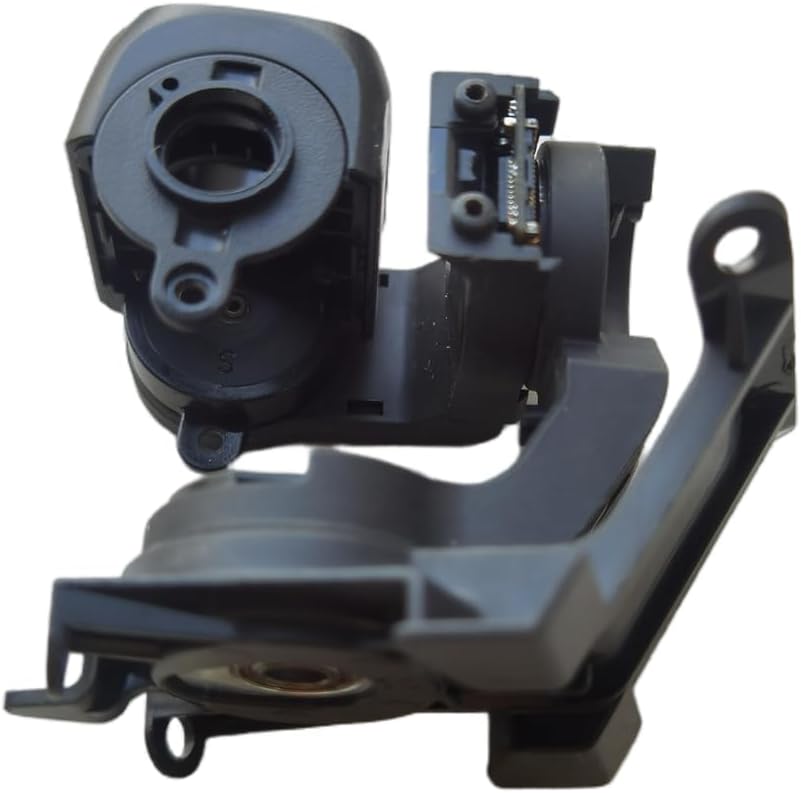
- Mavic Air 2 Gimbal Camera Arm Assembly, PTZ C...
0 ratings


Item #:
86158618
Mavic Air 2 Gimbal Camera Arm Assembly, PTZ Camera Arm Repair Part
Item #:
86158618
SCR 2471
Price Details
Excluding Shipping & Custom charges ( Shipping and custom charges will be calculated on checkout )
*All items will import from US
0 ratings
Write a review
In stock
 Imported from USA store
QTY:
Order now and get it around Sunday, August 02
Secured transaction
Ubuy works hard to protect your security and privacy. Our advanced payment security system ensures confidentiality by encrypting your information during transmission using AES (Advanced Encryption Standards) and SSL (Secure Socket Layer) protocols. Your payment details are 100% secure as we do not share your payment details with third party sellers.
Our Top Logistics Partners


Replace a damaged gimbal camera arm assembly with ease using this Mavic Air 2 Gimbal Camera Assembly Arm.

Fast
Shipping

Free
Return*

Secure Packaging

100% Original Products

PCI DSS Compliance

ISO 27001 Certified


Note: Step Down Voltage Transformer required for using electronics products of US store (110-120). Recommended power converters Buy Now.


What Stands Out
Quality Construction
Crafted from durable materials, this repair part ensures long-lasting performance and reliability, making it a superior choice for maintaining your Mavic Air 2's functionality.
Easy Installation
Designed for straightforward installation, this gimbal camera arm allows users to quickly replace damaged parts, minimizing downtime and enhancing user experience with their drone.
Compatibility Focused
Specifically engineered for the Mavic Air 2, this camera arm seamlessly integrates with your drone, ensuring optimal performance and enhancing flight stability compared to generic alternatives.
Product Details
| Item Weight | 0.5 lbs (230 grams) |
Who Should Buy?

-
Drone Enthusiasts
Ideal for hobbyists needing to repair or upgrade the gimbal for enhanced aerial photography capabilities.
-
Professional Filmmakers
Perfect for filmmakers seeking reliable and smooth camera motion to capture stable, high-quality aerial shots.
-
Repair Technicians
Essential for technicians looking to replace damaged camera arms in drones for effective repairs and maintenance.

-
Casual Users
Not suitable for occasional users who do not require advanced camera stabilization for their basic flying needs.
Product Description
Mavic Air 2 Gimbal Camera Arm Assembly, PTZ Camera Arm Repair Part
Have any Query? Chat with us
Customer Questions & Answers
-
Question:
What is the Mavic Air 2 Gimbal Camera Arm Assembly?
Answer: The Mavic Air 2 Gimbal Camera Arm Assembly is a crucial component that stabilizes your drone's camera, allowing for smooth video recording and clear images. This part ensures that the camera remains steady even during quick movements or windy conditions. When the gimbal arm is functioning properly, it helps in achieving cinematic shots, making it perfect for both amateur and professional drone users. If your footage is shaky or your camera doesn't tilt or rotate correctly, replacing the gimbal arm assembly is often necessary. -
Question:
How do I know if I need to replace the gimbal arm assembly?
Answer: You may need to replace the gimbal arm assembly if you notice abnormal behavior from your camera, such as shakiness in footage, failure to stabilize, or if the gimbal is unresponsive to controls. Additionally, physical inspection can reveal any cracks or misalignments that could hinder its functionality. If your Mavic Air 2 consistently produces unsatisfactory results in terms of image stabilization, then it's likely that the gimbal arm assembly requires replacement to restore optimal performance. -
Question:
Is the Mavic Air 2 Gimbal Camera Arm Assembly easy to install?
Answer: While the installation of the Mavic Air 2 Gimbal Camera Arm Assembly is manageable, it requires some technical knowledge and the right tools. You will typically need a small screwdriver to access the drone's inner components. There are numerous tutorials available online that demonstrate the step-by-step process, guiding you through disassembly and reassembly efficiently. This makes it feasible for hobbyists and those comfortable with minor drone repairs to successfully complete the installation. -
Question:
What tools do I need to replace the gimbal arm assembly?
Answer: To replace the gimbal arm assembly, you'll need a set of precision screwdrivers, particularly a small Phillips-head screwdriver suited for tiny screws. Additionally, having a pair of tweezers can help with handling small components. It's also beneficial to have a clean, organized workspace to avoid losing any screws or parts. By having the right tools handy, you can make the replacement process smoother and more straightforward. -
Question:
Can I repair the gimbal arm assembly instead of replacing it?
Answer: Repairing the gimbal arm assembly is possible, but it depends on the type of damage. If there are minor issues, such as loose screws or small alignments, you may be able to fix it yourself. However, if the arm is broken or there are significant electronic issues, replacement is usually the most reliable option. Using a functioning assembly ensures that your camera performs optimally, ultimately improving your flying and filming experience. -
Question:
Where can I buy the Mavic Air 2 Gimbal Camera Arm Assembly?
Answer: You can buy the Mavic Air 2 Gimbal Camera Arm Assembly from Ubuy in Seychelles. Ubuy offers a range of drone accessories, allowing you to choose the specific part you need for your repairs. Their user-friendly interface simplifies the shopping experience, making it easier to find compatible parts for your drone. When shopping on Ubuy, you can ensure that you're getting genuine products backed by reliable service. -
Question:
What should I check before purchasing a replacement gimbal arm assembly?
Answer: Before purchasing a replacement gimbal arm assembly, verify that it's compatible with your Mavic Air 2 model to avoid fitment issues. Additionally, check customer reviews and product ratings to ensure quality and reliability. Consider looking for parts that offer excellent craftsmanship, as this often indicates better durability and performance. Being thorough in your research helps you make an informed decision that will enhance your drone's functionality. -
Question:
How can I maintain my Mavic Air 2 gimbal to prolong its life?
Answer: To maintain your Mavic Air 2 gimbal, regularly inspect for dirt or debris that may affect its performance and clean it gently with a soft cloth. Avoid exposing it to extreme weather conditions, and handle your drone with care during transport to prevent physical damage. Scheduling routine maintenance checks can help catch potential issues early, ensuring that your gimbal operates smoothly for longer, ultimately sustaining the quality of your aerial photography. -
Question:
What are the common issues associated with gimbal arm assemblies?
Answer: Common issues with gimbal arm assemblies include misalignment, failure to stabilize, or unresponsive controls, often caused by physical damage or wear and tear. Users may notice shaky footage or jerky camera movements, which can hinder filming quality. Regular inspections can help you catch these problems early, and knowing the signs can guide you on when to repair or replace the assembly, thereby preventing further complications. -
Question:
What advantages does a functioning gimbal arm assembly provide?
Answer: A properly functioning gimbal arm assembly enhances video quality by stabilizing camera movements, resulting in smooth, professional-looking footage. It allows for seamless transitions during flight, enabling dynamic shots that capture the environment beautifully. This is particularly useful for filmmakers and content creators who rely on high-quality visuals to engage their audience. Overall, a well-operating gimbal boosts creativity and versatility in drone photography.
Taoke Camera Mounts & Clamps Editorial Review
No editorial reviews found
Customer Reviews & Ratings
1 customers ratings
-
5 Star
100%
-
4 Star
0%
-
3 Star
0%
-
2 Star
0%
-
1 Star
0%
Review this product
Share your thoughts with other customers
Platform Trust & Buyer Confidence

MA
Mohammad
Verified buyer
“Excellent quality and original too,when ubuy send original things I will appreciate that ,I very satisfied thank you”
23 July 2026 · via Trustpilot
CK
Chitra
Verified buyer
“The order and delivery progress was communicated very well. Package arrived within the estimated time. Products arrived as expected in good condition.”
22-Jul-26 · via Trustpilot
K
kund
Verified buyer
“Good supply of products. Safe payment methods, and shipment worldwide! Genuine products.”
23-Jul-26 · via Trustpilot
OO
Onesi
Verified buyer
“Was my first time buying a product from Ubuy, but I found it so helpful. This is reliable. Gonna place a new order!”
22 July 2026 · via Trustpilot
SJ
SAO JOHN
Verified buyer
“Ubuy is a great online platform to buy stuff. Reliable, fast delivery time and great value for money. I've been using Ubuy online shopping platform for three years now and will continue to do so.”
23 July 2026 · via Trustpilot
Secure Checkout
Global Delivery
Easy Returns
Genuine Products
Product Price History
Important information
- Limitations : For products shipped internationally, please note that any manufacturer warranty may not be valid; manufacturer service options may not be available; product manuals, instructions, and safety warnings may not be in destination country languages; the products (and accompanying materials) may not be designed in accordance with destination country standards, specifications, and labeling requirements; and the products may not conform to destination country voltage and other electrical standards (requiring use of an adapter or converter if appropriate). The recipient is responsible for assuring that the product can be lawfully imported to the destination country. When ordering from Ubuy or its affiliates, the recipient is the importer of record and must comply with all laws and regulations of the destination country.
- Not all the products listed on Ubuy are for sale, as Ubuy is a global search engine. Products are subject to export/trade regulations.
SCR 2471
Order now and get it around Sunday, August 02
This item is not restrict in my country.(Please click on above link if this item is not restrict in your country, So our team will review and allow.)
QTY:
Secured transaction
PCI DSS compliant and ISO 27001:2022 certified, with encrypted payments and full buyer protection on every order.
Our Top Logistics Partners
Fastest cross-border delivery
Features & Benefits
- Compatible with Mavic Air 2 drone only
- Ideal for replacing damaged camera arm assembly
- Professional installation required
- Please be careful during installation
Ubuy Assurance
Experience worry-free shopping with 100% original products, PCI DSS-compliant payment security, ISO 27001-certified data protection, the fastest cross-border delivery, free returns *, and secure packaging on every order.