- Home Page /
- Electronics /
- Computer Accessories /
- Computer Accessories & Peripherals /
- Keyboards, Mice & Accessories /
- Computer Keyboards /
- Switches Buttons Key Shaft for Logitech G810 ...
0 ratings

Item #:
39492407
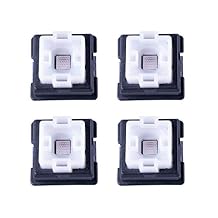
Switches Buttons Key Shaft for Logitech G810 G910 G613 G539 G413 G512 Pro Mechanical Keyboard 4PCS Replacement Repair Parts for Romer G
Item #:
39492407
SCR 260
Price Details
Excluding Shipping & Custom charges ( Shipping and custom charges will be calculated on checkout )
*All items will import from US
0 ratings
Write a review
In stock
 Imported from USA store
QTY:
Order now and get it around Friday, July 24
Secured transaction
Ubuy works hard to protect your security and privacy. Our advanced payment security system ensures confidentiality by encrypting your information during transmission using AES (Advanced Encryption Standards) and SSL (Secure Socket Layer) protocols. Your payment details are 100% secure as we do not share your payment details with third party sellers.
Our Top Logistics Partners


They can replace your broken/ damaged/ faulted/ non-working keyboard switches.

Fast
Shipping

Free
Return*

Secure Packaging

100% Original Products

PCI DSS Compliance

ISO 27001 Certified


Note: Step Down Voltage Transformer required for using electronics products of US store (110-120). Recommended power converters Buy Now.


What Stands Out
Enhanced Durability
Designed specifically for Logitech keyboards, these replacement switches offer improved longevity compared to standard components, ensuring a more reliable gaming experience for avid players.
Easy Installation
These key shafts provide a straightforward installation process, allowing users to quickly replace worn-out switches without specialized tools, making keyboard maintenance effortless.
Precision Feedback
Engineered for responsiveness, these switches deliver tactile feedback that enhances typing and gaming performance, allowing for greater accuracy and speed during intense gaming sessions.
Product Details
| Item Weight | 0.15 lbs (70 grams) |
Who Should Buy?

-
Keyboard Enthusiasts
Perfect for gamers and typists seeking customized key feel and durability in their Logitech mechanical keyboards.
-
DIY Repairs
Ideal for individuals looking to repair or replace damaged switches on Logitech G series mechanical keyboards easily.
-
Budget-Conscious Users
Great option for users wanting to rejuvenate their keyboards without investing in a brand new device.

-
Non-Logitech Keyboards
Not suitable for keyboards from other brands, as these switches are designed specifically for Logitech G models.
-
Casual Users
May not be necessary for users who rarely game or type intensely and do not require switch customization.
-
Beginners
Individuals unfamiliar with mechanical keyboard repairs might struggle with installation and compatibility issues.
Product Description
Switches Buttons Key Shaft for Logitech G810 G910 G613 G539 G413 G512 Pro Mechanical Keyboard 4PCS Replacement Repair Parts for Romer G
Have any Query? Chat with us
Customer Questions & Answers
-
Question:
What are LICHIFIT Switches Buttons Key Shaft for Logitech keyboards?
Answer: LICHIFIT Switches Buttons Key Shaft are replacement parts specifically designed for Logitech's mechanical keyboards, including models like G810, G910, G613, G539, G413, and G512 Pro. These key shafts are tailored to seamlessly fit the Romer-G switch mechanism, enhancing both the functionality and feel of your keyboard. If you experience any issues with your original keys, these replacements can restore it to peak performance, making sure each keystroke is responsive and satisfying. -
Question:
How do I install the LICHIFIT Switches Buttons?
Answer: To install LICHIFIT Switches, begin by gently removing the original keycap using a keycap puller. Once removed, locate the switch stem, and if necessary, remove it using a small flathead screwdriver. Align the new LICHIFIT key shaft with the switch housing and press it into place until it clicks. This detailed process ensures a snug fit, restores the keyboard’s responsiveness, and extends its lifespan, making it suitable for gamers and regular users alike requiring reliable performance. -
Question:
Are these switches compatible with all Logitech keyboards?
Answer: No, LICHIFIT Switches are specifically designed for Logitech keyboards that utilize Romer-G switches, such as the G810, G910, and G512 Pro. Using them on non-compatible models may result in improper fit or functionality. Always confirm your keyboard model before purchasing these replacement parts to ensure optimal performance and compatibility. This focus on the right specifications is crucial for those who depend on their keyboards for gaming or professional use. -
Question:
What benefits do LICHIFIT Switches offer over original switches?
Answer: LICHIFIT Switches can provide a fresh feel and enhanced durability compared to worn original switches. As you use your keyboard, the original key switches may become less reliable. By replacing them with LICHIFIT options, you can experience improved tactile feedback, responsiveness, and longevity. These benefits are especially meaningful for avid gamers or typists who require precise and dependable input. -
Question:
Can I mix different types of switches on my Logitech keyboard?
Answer: Mixing different types of switches is generally not recommended, as it can affect the uniformity of key feel and performance. LICHIFIT Switches are designed to match Romer-G switches, maintaining consistency in travel distance and tactile feedback. For the best experience, it's advisable to replace all switches with LICHIFIT ones if you need changes, ensuring a cohesive feel across the entire keyboard for both gaming and typing tasks. -
Question:
Why choose LICHIFIT over other third-party switch options?
Answer: Choosing LICHIFIT Switches ensures compatibility and quality specifically tailored for Logitech's Romer-G mechanism. Other third-party switches may not achieve the same level of performance or fit. LICHIFIT focuses on replicating the original feel while offering reliable performance, making them an ideal choice for gamers or anyone seeking to maintain their keyboard's integrity and aesthetics without compromising functionality. -
Question:
How many LICHIFIT switches come in a package?
Answer: Each package of LICHIFIT Switches includes four key shafts, which allows you to replace multiple keys on your Logitech keyboard at once. This is a convenient option for users who regularly engage in gaming or extended typing sessions and need to address multiple key issues without ordering additional sets. By having the right amount on hand, you can ensure a full restoration or enhancement of key performance across your most-used keys. -
Question:
What if my keycaps don't fit after replacing the switches?
Answer: If you experience trouble with keycap fitting after installing LICHIFIT Switches, check for proper alignment and ensure that the keycap puller was used effectively to remove the original keys. Incompatibility may arise if your keycaps are not designed for Romer-G switches. Always use keycaps specified for Romer-G or compatible switches to guarantee a perfect fit, preserving the tactile experience and aesthetic of your keyboard. -
Question:
How do I maintain my mechanical keyboard after replacing the switches?
Answer: Once you've replaced your switches with LICHIFIT units, maintaining your mechanical keyboard involves regular cleaning and checking of key mechanics. Use compressed air to remove debris and ensure the key switches are free from dust build-up. Regular maintenance protects the integrity of the switches and prolongs the life of your keyboard, making it suitable for gamers who demand high performance over time. -
Question:
Where can I buy LICHIFIT Switches Buttons Key Shaft?
Answer: You can purchase LICHIFIT Switches Buttons Key Shaft for your Logitech keyboards at Ubuy. Ubuy provides a reliable online shopping platform with a range of options for keyboard accessories, ensuring you can find the specific components that meet your needs. This site is particularly beneficial for users in Seychelles, as it offers accessible and trustworthy service for sourcing quality replacement parts.
LICHIFIT Keyboards Editorial Review
No editorial reviews found
Customer Reviews & Ratings
1 customers ratings
-
5 Star
0%
-
4 Star
100%
-
3 Star
0%
-
2 Star
0%
-
1 Star
0%
Review this product
Share your thoughts with other customers
Platform Trust & Buyer Confidence

MT
Mohd
Verified buyer
“The product received very good packaging & safe…Thank You”
16 June 2026 · via Trustpilot
SJ
Shawati
Verified buyer
“Accurate delivery timing given”
16 June 2026 · via Trustpilot
YB
Youcef
Verified buyer
“Not madly expensive like I thought, and much quicker than promised.”
15 June 2026 · via Trustpilot
LM
Leila
Verified buyer
“Never dealt with Ubuy before, but everything worked out great. Seamless cross border purchasing and shipping. Thanks!”
6/7/2026 · via Trustpilot
KA
Kwame
Verified buyer
“The process was smooth, with clear communication and timelines. This was my 1st purchase and I am really impressed. I will definitely be coming back.”
12 June 2026 · via Trustpilot
Secure Checkout
Global Delivery
Easy Returns
Genuine Products
Product Price History
Important information
- Limitations : For products shipped internationally, please note that any manufacturer warranty may not be valid; manufacturer service options may not be available; product manuals, instructions, and safety warnings may not be in destination country languages; the products (and accompanying materials) may not be designed in accordance with destination country standards, specifications, and labeling requirements; and the products may not conform to destination country voltage and other electrical standards (requiring use of an adapter or converter if appropriate). The recipient is responsible for assuring that the product can be lawfully imported to the destination country. When ordering from Ubuy or its affiliates, the recipient is the importer of record and must comply with all laws and regulations of the destination country.
- Not all the products listed on Ubuy are for sale, as Ubuy is a global search engine. Products are subject to export/trade regulations.
SCR 260
Order now and get it around Friday, July 24
This item is not restrict in my country.(Please click on above link if this item is not restrict in your country, So our team will review and allow.)
QTY:
Secured transaction
PCI DSS compliant and ISO 27001:2022 certified, with encrypted payments and full buyer protection on every order.
Our Top Logistics Partners
Fastest cross-border delivery
Features & Benefits
- 4PCS Switches buttons keys
- Black, Blue, Gray colors
- Suitable for Logitech G810 G910 G413 G513 Pro keyboards
- Key shaft mechanical trigger, distance up to 1.5mm
- Decreased touch distance by 25% & speed increased by 25%
- Simple to replace and money-saving
Ubuy Assurance
Experience worry-free shopping with 100% original products, PCI DSS-compliant payment security, ISO 27001-certified data protection, the fastest cross-border delivery, free returns *, and secure packaging on every order.