- Home Page /
- Electronics /
- Computer Accessories & Peripherals /
- Input Devices /
- Computer Accessories /
- Digital Pens /
- Surface Pen,Active Stylus Pen for Surface GO,...
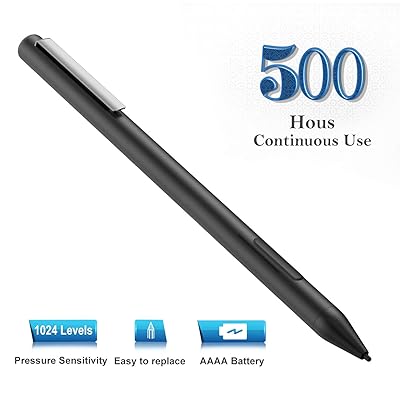


Surface Pen,Active Stylus Pen for Surface GO,Surface Pro 3,Pro 4,Pro 5,Pro 6; Surface Pro 2017,Surface LaptopBookStudio,with 1024 Levels of Pressure
80% of respondents would recommend this to a friend
 Imported from USA store

Ubuy works hard to protect your security and privacy. Our advanced payment security system ensures confidentiality by encrypting your information during transmission using AES (Advanced Encryption Standards) and SSL (Secure Socket Layer) protocols. Your payment details are 100% secure as we do not share your payment details with third party sellers.


Fast
Shipping

Free
Return*

Secure Packaging

100% Original Products

PCI DSS Compliance

ISO 27001 Certified





What Stands Out
Product Details
| Brand Name | NEW POW |
| Item model number | ME-MPP303B |
| Item Weight | 0.48 ounces (13.61 grams) |
| Package Dimensions | 6.5 x 2 x 0.5 inches (16.5 x 5.1 x 1.3 cm) |
| Color | Black |
| Shipping Weight | 1.6 ounces (45.36 grams) |
Who Should Buy?

-
Digital Artists
Ideal for digital artists seeking precision and control with 1024 levels of pressure sensitivity in their work.
-
Students & Note-takers
Great for students who prefer writing notes or drawing diagrams on tablets during lectures and study sessions.
-
Business Professionals
Beneficial for professionals who use Surface devices for presentations and require a reliable tool for annotations.

-
Casual Users
Not suitable for casual users who rarely utilize stylus features on their devices for simple tasks.
Product Description
Surface Pen,Active Stylus Pen for Surface GO,Surface Pro 3,Pro 4,Pro 5,Pro 6; Surface Pro 2017,Surface LaptopBookStudio,with 1024 Levels of Pressure Sensitivity and 500 Hours Continue TimeBlack
Customer Questions & Answers
-
Question:
What devices are compatible with the Surface Pen?
Answer: The Surface Pen is compatible with various Microsoft Surface devices, including the Surface Go, Surface Pro 3, Pro 4, Pro 5, Pro 6, and the Surface Laptop. Its advanced technology allows for seamless interaction and fine precision across these devices. If you are a student who takes notes, the Surface Pen can transform your writing into digital text effortlessly. Designers can sketch, doodle, or create intricate designs, making it a versatile tool suitable for different needs. -
Question:
What features does the Surface Pen offer?
Answer: The Surface Pen offers a range of features including 1024 levels of pressure sensitivity, tilt support, and an ergonomic design. This allows for a natural writing experience similar to that of pen on paper. With its high precision, artists can achieve remarkable detail in their work, and note-takers can write smoothly without interruption. The pen also includes an eraser feature on its top, making it practical for quick corrections. -
Question:
How does the Surface Pen connect to my Surface device?
Answer: The Surface Pen connects wirelessly to your Surface device via Bluetooth. Simply turn on the pen, and it will automatically pair with your device for instant use. This connection allows for a seamless writing and drawing experience without the need for additional setup. Whether you are signing documents or sketching designs, the automatic pairing ensures you get straight to work without delays. -
Question:
Is the Surface Pen rechargeable?
Answer: The Surface Pen operates on a AAAA battery rather than being rechargeable. This design choice ensures long-lasting usage, often allowing several months of usage before needing a replacement. If you tend to use your pen frequently for lengthy projects, having a good supply of AAAA batteries can ensure that you stay productive without interruptions. For optimal performance, consider keeping an extra battery on hand when you're heavily involved in creative tasks. -
Question:
Can the Surface Pen be used for drawing?
Answer: Absolutely! The Surface Pen is specifically designed to cater to artists and designers, thanks to its 1024 levels of pressure sensitivity and tilt recognition. This allows users to create varying line thicknesses and shades depending on the pressure applied. Whether you're an experienced artist or a beginner, you can create stunning digital art, making it an essential tool for creative professionals. -
Question:
How do I change the tip of the Surface Pen?
Answer: Changing the tip of the Surface Pen is simple and requires no tools. Gently pull out the old tip, and insert the new one by pushing it into the end of the pen until it is securely in place. Different tip options are available, allowing for varying textures and resistance based on your preferences. This customization enhances your drawing experience by allowing you to choose a tip that feels comfortable to you. -
Question:
What applications can I use with the Surface Pen?
Answer: The Surface Pen can be used with a variety of applications including Microsoft OneNote, Adobe Photoshop, and Autodesk SketchBook, among many others. These applications take full advantage of the pen's capabilities such as pressure sensitivity and tilt support. Whether you’re jotting down notes in class or illustrating a project, the pen enhances productivity and creativity across different platforms. -
Question:
Is the Surface Pen comfortable to hold for extended periods?
Answer: Yes, the Surface Pen is ergonomically designed, which makes it comfortable for prolonged use. Its lightweight construction and balanced feel reduce fatigue during long drawing sessions or note-taking marathons. This comfort factor is vital for artists and professionals who may spend hours refining their work, ensuring that creativity flows without the distraction of discomfort. -
Question:
How can I purchase the Surface Pen?
Answer: You can purchase the Surface Pen through various retailers. However, if you are looking for a reliable online option, check out Ubuy. They offer a straightforward purchasing process and ensure that you receive a legitimate product. Ubuy provides options tailored to your location, making it simple to find exactly what you need delivered to you. -
Question:
Can I use the Surface Pen on other devices?
Answer: While the Surface Pen is optimized for Microsoft Surface devices, it might work with some other touch-enabled devices that support Windows Ink. However, performance and features may vary, and full functionality is best experienced with compatible Surface models. If you’re looking to use it across devices, ensure they support the necessary technology for optimal use.
NEW POW Digital Pens ME-MPP303B Editorial Review
Customer Reviews & Ratings
-
5 Star
100%
-
4 Star
0%
-
3 Star
0%
-
2 Star
0%
-
1 Star
0%
Review this product
Share your thoughts with other customers
Platform Trust & Buyer Confidence

“Easy to use and always helpful and sorts any issues I've had past and present”
“I always receive support when I engage customer service. Overall my experience with UBUY has been top notch. Keep up the good work.”
“The delivery was fast and the product came undamaged and authentic.”
“Ubuy is extremely efficient and to order online is an easy process. The verity of products to buy is really unlimited! My order was urgent and I got it on time. The products are great! Thank you Ubuy!”
“Fast, convenient and cheap. Great store!”
Important information
- Limitations : For products shipped internationally, please note that any manufacturer warranty may not be valid; manufacturer service options may not be available; product manuals, instructions, and safety warnings may not be in destination country languages; the products (and accompanying materials) may not be designed in accordance with destination country standards, specifications, and labeling requirements; and the products may not conform to destination country voltage and other electrical standards (requiring use of an adapter or converter if appropriate). The recipient is responsible for assuring that the product can be lawfully imported to the destination country. When ordering from Ubuy or its affiliates, the recipient is the importer of record and must comply with all laws and regulations of the destination country.
- Not all the products listed on Ubuy are for sale, as Ubuy is a global search engine. Products are subject to export/trade regulations.
Currently unavailable.
We don't know when or if this item will be back in stock.
This item is not restrict in my country.(Please click on above link if this item is not restrict in your country, So our team will review and allow.)
PCI DSS compliant and ISO 27001:2022 certified, with encrypted payments and full buyer protection on every order.
Ubuy Assurance
Experience worry-free shopping with 100% original products, PCI DSS-compliant payment security, ISO 27001-certified data protection, the fastest cross-border delivery, free returns *, and secure packaging on every order.